← All projectsCorgi Hackathon, San FranciscoJul 2026
Golden Retriever
Assistive fetch robot
Text it what you need and it drives over, grabs it with a learned grasp, and brings it back.
Golden Retriever is a fetch robot for people with limited leg mobility. You text it what you need; it drives to the shelf on depth estimated from a single webcam, finds the item with a second one, picks it up with an SO-101 arm running a policy we trained on 40 of our own demonstrations, and brings it back.
Four of us built it overnight in 10 hours at the Corgi hackathon in San Francisco. At judging the whole loop ran end to end, and we took 2nd of 250+ teams. Below: one errand on our CAD as you scroll, the drive, the lift and the arm moving about their real axes, how each stage works, and what did not work well.
Text it, and it goes and gets it
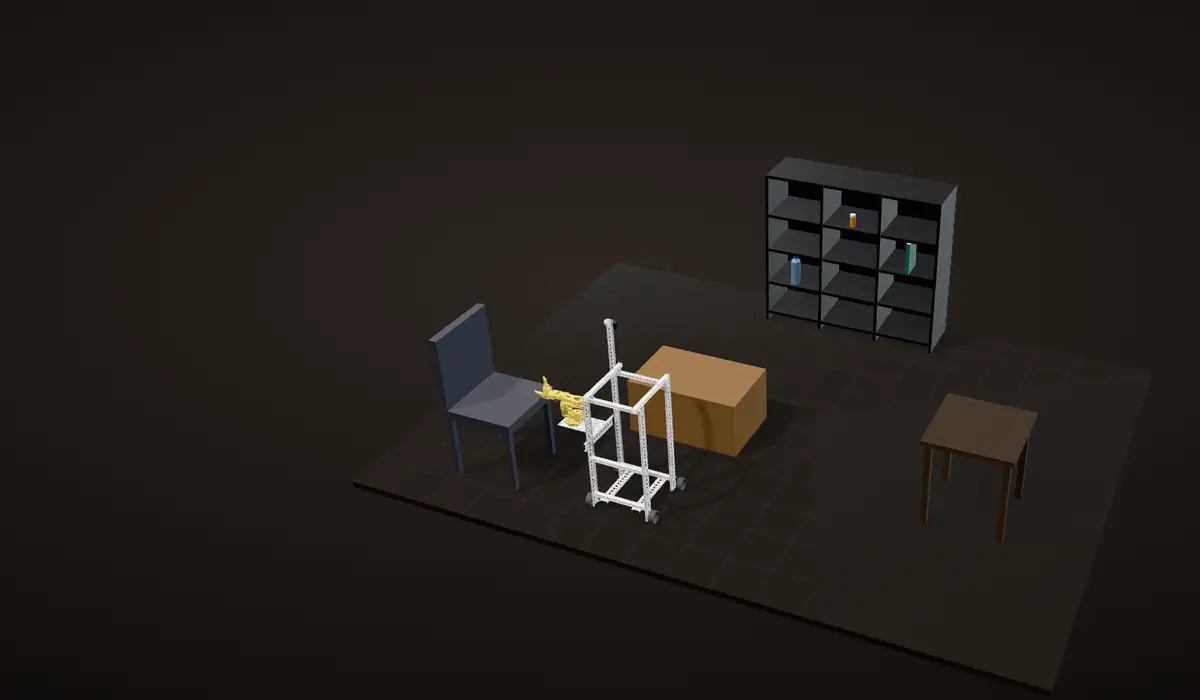
One errand on our CAD, as you scroll. A text asks for the pill bottle, one of three things on the shelf, and the robot drives there, finds it, raises its arm, grabs it and brings it back. The replies in the thread are the lines our robot sent at the hackathon, word for word from our code, and the robot is our CAD: the wheels, the winch, the carriage and all six arm joints turn about the axes in that CAD.
1. Ask
A text over iMessage, or the same chat on our web page, names the item. Claude works out which item you mean, and the robot confirms right away: "Okay. Going to get the pill bottle now."
2. Drive on depth from one webcam
The drive camera feeds a monocular depth model: no depth sensor, just one image and a network that estimates how far away everything is. The robot marks floor cells as free or blocked and plans a path through the free ones, and the laptop on the robot drew exactly that: a floor grid over the camera image, green where the floor is clear, red where it is not, and the path on top.
Ask what it is doing on the way and it answers in the same thread: "Still working on the pill bottle. Looking for the pill bottle."
3. Find it with the side camera
A second webcam, low on the side and angled up at the shelf, runs HSV colour detection, so the item is found by its colour. It watches while the robot drives along the shelf, and it looks the same way the arm reaches, so the robot parks with the item right beside the arm.
4. Lift the arm to the shelf
A servo at the top of the mast winds the winch line in, and the carriage carries the whole arm up its rails to the item's height, 112 mm for every turn of the winch pulley.
5. Grab it with a learned policy
The SO-101 runs an ACT policy (Action Chunking with Transformers) that we trained on about 40 teleoperated demonstrations. Its only view is a third webcam on the claw. At each step it predicts a chunk of upcoming motion, 100 joint targets, instead of a single command.
The dots ahead of the gripper sketch that idea; they are not recorded policy output.
6. Bring it back
It drives back and says so in the thread: "Here's the pill bottle." If it cannot find the item it says that too, instead of failing silently: "I couldn't find the pill bottle. Is it somewhere else?"
A simulation on our CAD, not a recording. The room, the three items and their shelf heights are props for this page. The path comes from A* on a map of the room, where the real robot built its grid from the depth camera as it drove, and the arm plays fixed keyframes, where the real grasp came from the learned policy.
The problem

Our pitch opened with a number: 15 million people worldwide live with a spinal cord injury. Water, a phone, pills: things most people grab without thinking can mean waiting for someone else to be in the room.
Golden Retriever lets the person ask by text instead, in the Messages app they already use. We wrote its replies like a person talking, not a machine log: "Okay. Going to get the water bottle." and then "Here's the water bottle."
The robot
Frame
A box frame of goBILDA low-side U-channel and goRAIL, 349 by 384 mm, with the top deck about 73 cm off the floor. The deck carries the laptop and a clear bin. One corner post is a 1,008 mm channel that runs on above the deck as the mast for the lift.
Arm placement
The SO-101 faces sideways, not forward. The robot drives up alongside the shelf and parks with the item beside it, the arm reaches out to the side, and the detection camera looks the same way.
Three webcams, one laptop
All three cameras are Logitech C920 webcams, and each has one job. One looks where the robot drives and feeds the depth model. One sits low on the side, angled up, and finds the item. One rides on the SO-101's claw, and it is the only camera the grasp policy sees. Everything ran on the one laptop on the top deck: the cameras, the depth model, detection, the policy and the messaging. The cameras and the laptop are not in the CAD.
| From the CAD | Value |
|---|---|
| Footprint (frame) | 349 x 384 mm |
| Deck height / mast top | about 0.73 m / 1.02 m |
| Track (driven wheels) / wheelbase | 397 mm / 322 mm |
| Wheel travel per turn (72 mm wheel) | 226 mm |
| Lift rails / carriage travel | 2 x 600 mm MGN9 / about 56 cm |
| Arm height above the floor (grid plate) | 0.17 to 0.73 m |
| Winch pulley | 112 mm of line per turn (17.8 mm radius) |

Drive: servos, not motors
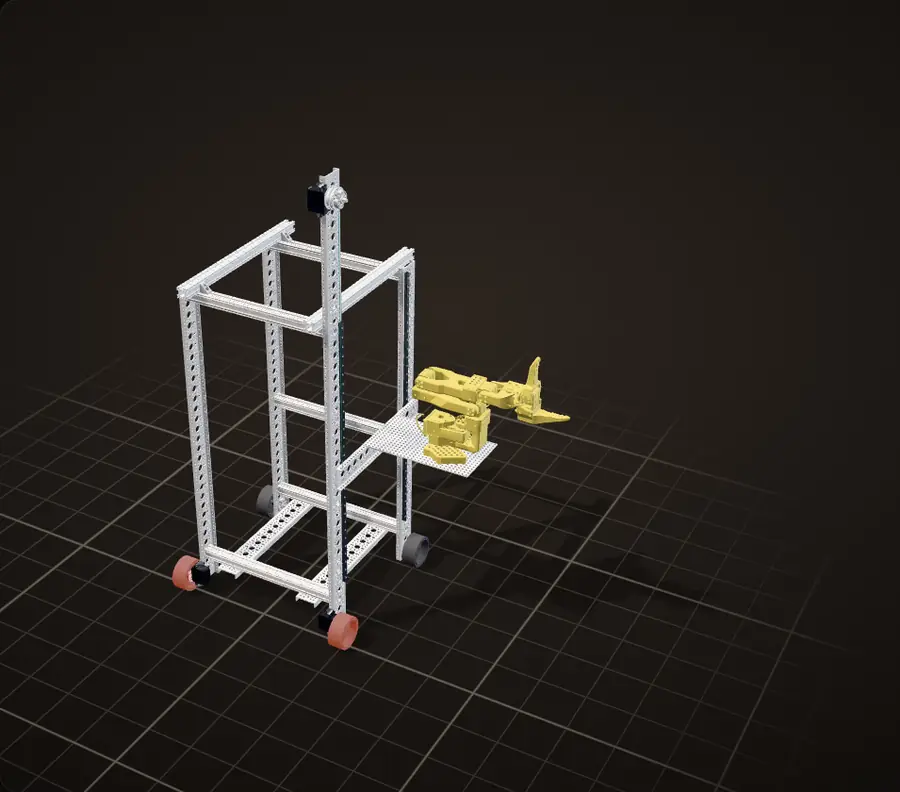
Our CAD on a floor grid that slides under it as you scroll. The two driven wheels are lit orange, and the yellow line is the path it is on at that moment.
Two servos, two wheels
Two Axon MAX MK2 servos drive two 72 mm Rhino wheels directly, through 25T low-profile servo hubs, with no gearbox in between. The other two wheels run free on 8 mm REX shafts in flanged bearings. The driven wheels sit 397 mm apart and the axles 322 mm apart.
No motor driver
We used the Axon MAX servos because we had them, and because a servo needs no external motor driver: an Arduino Mega 2560 Pro sends each one a standard PWM pulse (1,500 µs is stop, 1,000 and 2,000 µs are full speed each way) and the electronics inside the servo do the rest. With one night to build, that was a driver board and its wiring we did not need. I did all of the soldering.
The drive code in our repo caps the pulse at 300 µs either side of stop, out of the 500 the servos accept, so the robot moves deliberately next to a person. Here both sides get that 1,800 µs, and it drives straight.
Steering by speed
It steers by running the two sides at different speeds. Slow the arm side to 1,650 µs and the robot curves toward it; the readout gives the radius of that curve from the 397 mm track.
Turning in place
Run the two sides in opposite directions and it turns in place. The free wheels are on fixed axles, so a turn drags them sideways a little.
Wheel speed is taken as proportional to the pulse's offset from 1,500 µs, and the floor moves at an illustrative pace: the robot's real top speed is not known. The wheels turn about their axles in the CAD by the distance each side rolls.
Calculation How fast could it drive?
| Axon MAX MK2 rated speed at 4.8 V | 0.140 s per 60° | Axon Robotics |
|---|---|---|
| at 8.4 V | 0.085 s per 60° | Axon Robotics |
| Wheel travel per turn (72 mm wheel) | 226 mm | measured from our CAD |
| Pulse cap in our drive code, either side of stop | 300 of 500 µs | our code |
- Servo top speed: 60° / 0.140 s = 429°/s = 71 rpm, up to 60° / 0.085 s = 706°/s = 118 rpm
- At full pulse: 71 to 118 rpm is 1.19 to 1.96 turns a second, x 0.226 m = 0.27 to 0.44 m/s
- At our cap: 300 / 500 = 60 % of that, 0.16 to 0.27 m/s
Capped, the robot would roll at about 0.2 m/s, and under half a metre a second even at full pulse.
Estimate, not measured: the rated speed taken as the top speed in continuous rotation, speed proportional to the pulse (as in the drive above), no load and no slip. The supply voltage is not recorded, hence the range.
Calculation How tight is the curve at 1,650 µs?
| Track | 397 mm | measured from our CAD |
|---|---|---|
| Pulse, far side | 1,800 µs | the drive above |
| Pulse, arm side | 1,650 µs | the drive above |
- Wheel speeds, proportional to the offset from 1,500 µs: 300 and 150, a ratio of 2 to 1
- Radius of the robot's centre: R = (397 mm / 2) x (300 + 150) / (300 - 150) = 198.5 mm x 3 = 0.60 m
- Inner wheel: 0.60 - 0.20 = 0.40 m, one track width; outer wheel: 0.79 m
Halving one side's speed turns the robot on a 0.6 m radius, the figure in the readout above.

The lift: a winch on the mast
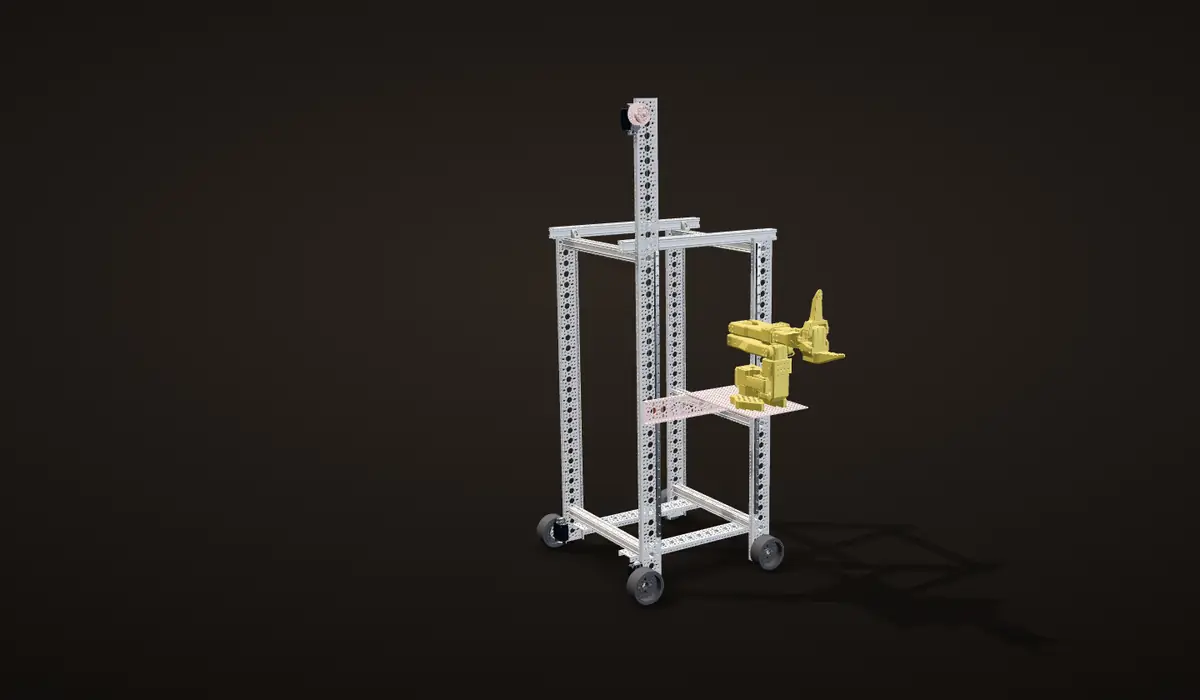
The carriage runs on its rails in our CAD as you scroll, the winch pulley turns by the line it winds, and the line shortens with it.
A carriage on two rails
The arm does not sit on the frame. It stands on a 136 by 232 mm grid plate on a carriage with two MGN9H blocks riding two 600 mm MGN9 rails on the side of the frame.
A winch at the top
A continuous-rotation servo at the top of the mast winds a 1 mm synthetic line onto a hub-mount winch pulley with a 112 mm circumference, so one turn of the pulley moves the arm 112 mm.
Paying out line to let it down
The line runs only from the top: the winch pulls the carriage up and pays out line to let it down. In the CAD the carriage has about 56 cm of travel, and the grid plate the arm stands on goes from 0.17 to 0.73 m above the floor.
Five turns for the full stroke
Problem The lift was slow
The lift worked, but slowly. The winch drum is small: a 112 mm circumference is a 17.8 mm radius (from the CAD), so a full 56 cm stroke is five turns of the servo. And that one servo carries the whole SO-101 and the carriage on a single line, which is a heavy load for it and slows it down further.
The carriage stops where its blocks reach the ends of the rails in the CAD. The servo's real speed is not known, so the lift moves with your scroll, not in real time.
Calculation The winch: turns against torque
| Winch pulley, line per turn | 112 mm | measured from our CAD |
|---|---|---|
| Carriage travel | about 56 cm | measured from our CAD |
- Drum radius: 112 mm / 2π = 17.8 mm
- Full stroke: 560 mm / 112 mm per turn = 5.0 turns
- Each kilogram on the line pulls 9.81 N, so it asks the servo for 9.81 N x 0.0178 m = 0.175 N·m, 1.8 kg·cm
- A drum twice the size would need 2.5 turns for the stroke, but 3.6 kg·cm per kilogram
The small drum trades speed for torque: each kilogram of arm and carriage costs the servo only about 1.8 kg·cm, and the price is five turns for the full stroke.
Static, ignoring friction in the rails and the line. The weight of the arm and carriage and the winch servo's rating are not recorded, so there is no margin to show.
Built in one night

Six joints on the SO-101
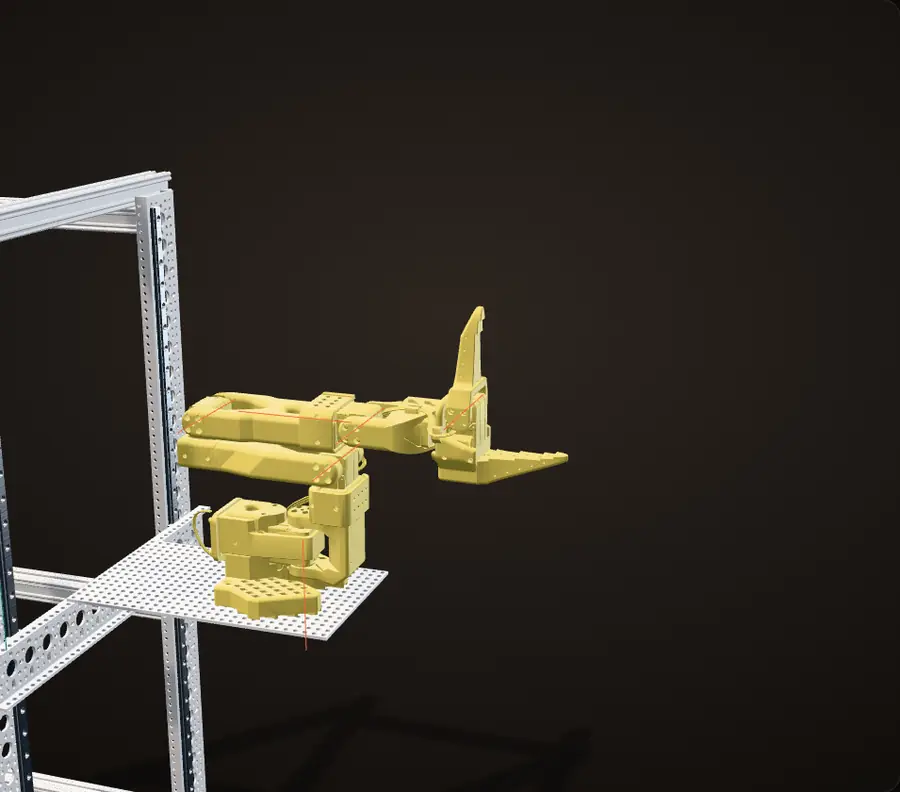
Our CAD's arm, joint by joint as you scroll. Orange lines are the joint axes; the readout follows each angle.
One solid, seven links
The arm is one solid in the CAD export. For this page it was split into its seven printed links, and each joint turns about the axis of its servo horn, checked against the STEP file. All six joints at zero is the pose in the CAD: folded, with the jaw wide open.
Shoulder pan and lift
The shoulder pan turns the whole arm about a vertical axis; the shoulder lift stands the upper arm up. The arm faces sideways, out of the side of the robot, toward the shelf.
Elbow and wrist flex
The elbow brings the forearm level and out over the shelf, and the wrist flex tips the gripper up and down at the end of it.
Wrist roll and gripper
In these poses the wrist roll turns the jaws so they close sideways around a standing bottle, and the gripper is the sixth joint: one moving jaw against a fixed one.
Carry
The carry pose on this page tucks the arm in, clear of the mast. On the real robot, fixed keyframes took over after the grip every time; only the grip itself was learned (see the grasp).
Our CAD with the screws, nuts and the servo board left out. The poses here are for the page; on the robot the policy chose the reach.
Asking for things
Requests come in as text. An iMessage reaches the robot through Photon, one of the hackathon's sponsor APIs, and our web page ("Text me what you need") posts to the same handler. The text then goes through Merge Gateway, the other sponsor API, to Claude, which works out which item you want.
The robot keeps you posted in the same thread:
- "Okay. Going to get the pill bottle now." when it starts
- "Still working on the pill bottle. Looking for the pill bottle." if you ask what it is doing mid-task
- "Here's the water bottle." when it delivers
- "I couldn't find the pill bottle. Is it somewhere else?" when it can't find it
The page also has a Walk with me panel with Forward, Back, Left and Right buttons. The idea behind it was a walker that senses your pace and assists you, the way a pedal-assist e-bike does. We ran out of time to build it.

The last reply is not hypothetical. In one of our takes the robot came back with "I couldn't find the pill bottle. Is it somewhere else?", and we asked again.
Getting there: depth from one webcam
Navigation runs on one ordinary webcam. A monocular depth model estimates how far away everything in its view is, and the planner works on the floor in front of the robot.
The laptop on the top deck shows what the planner sees, in a window titled "Depth + SegFormer Safe Path" with four panels: the floor and path camera with a grid of floor cells drawn over it (free cells green, blocked cells red, the chosen path on top), a depth clearance map, a floor mask, and the target camera. A status line under the grid shows the left and right servo commands, and the header shows the current drive command, like FORWARD.
Finding the item: the side camera
The second webcam sits low on the side of the robot, angled up at the shelf, and watches while the robot drives. It runs HSV colour detection: each frame is converted from RGB to hue, saturation and value, pixels inside a calibrated band for the item's colour become a mask, and the biggest blob in the mask is the item. Hue separates colour from brightness, which makes it more tolerant of uneven light than thresholding RGB directly. The pill bottle is bright amber on a black shelf, close to the easiest case for colour.
The target camera panel reads NO BOTTLE until the bottle comes into view, then BOTTLE with a distance and a pixel offset from the image centre: 49 cm and x -261 px in the frame beside this.

Grabbing it: ACT on an SO-101
The grasp is learned, not scripted. We recorded about 40 demonstrations by teleoperation: a teammate moved a leader SO-101 by hand over the shelf, the follower arm on the robot copied it, and every frame stored the claw camera image and the six joint positions, 30 times a second. Our recording plan ended each demonstration as soon as the jaws were firmly closed, so the policy only learns the hard part: see the bottle, reach, grip. The dataset in our repo is 40 episodes and 10,282 frames, about 8.6 seconds per demonstration.
We trained ACT (Action Chunking with Transformers) on it. The policy gets one 640 by 480 image from the claw camera plus the six joint angles, encodes the image with a ResNet-18, and a transformer outputs the next 100 joint targets at once, 3.3 seconds of motion at 30 Hz. Committing to a chunk instead of one command per frame means small errors get fewer chances to compound, which is why a few dozen demonstrations can be enough.
Risk An unpredictable arm next to a person
A learned policy can do anything its network outputs, and after the grip the arm is holding the bottle.
Fix
Only the grip is learned. Our run script trusts the policy until it sees a grip: the policy is commanding the jaws shut but the measured jaw stalls more than 3 units short of the command for 8 frames in a row. Then fixed keyframes take over with the gripper pinned shut, so the retract is the same every time.
Problem Half the grasps at the demo
The grasp depends on the light. It was reliable in good lighting, but during the demo it worked only about half the time. The claw camera is the policy's only view of the world, so whatever the room's lighting does to that image, the policy has to cope with. Our training config also had image augmentation (random brightness and contrast) switched off, so it only ever saw the light it was recorded in.
Next time
Put an LED at the end of the arm, next to the claw camera, so the policy sees the bottle lit the same way in any room.

The code
Our code is public: github.com/jerryli08/corgi-hackathon. The robot runs one Python server (FastAPI) on its laptop, plus an Arduino sketch for the drive. The main pieces:
robot/messaging.py: iMessage in and out through Photon, behind an outbox that rate-limits and de-duplicates texts.robot/brain.py: free text in, one typed intent out (fetch, come, walk, stop, status, help or chat). A fast Claude model answers first through Merge Gateway; a stronger one gets a turn only when the fast one is less than 65% sure, and a keyword router is the fallback when the network fails.robot/concierge.py: the seam between the phone and the robot. Every sentence the robot sends is a constant in this one file, so its voice stays consistent.robot/skills.py: an errand as a state machine (search, approach, grasp, stow, return, present), one skill at a time, reporting each phase on an event bus that the web page and the texts listen to.robot/drive.pyandfirmware/drivebase/drivebase.ino: velocity commands in, servo pulses out.datasets/andscripts/run_grasp_policy.py: the 40 demonstrations, the trained ACT policy and the script that runs it on the arm.
Risk A stalled laptop keeps the wheels turning
The drive is open loop: no encoders. If the laptop stalls in the middle of a command, the servos keep turning at the last pulse they were sent.
Fix
Two watchdogs. Every velocity command carries a duration, and the host stops the wheels itself if the next one is late. The Arduino has its own: if no command arrives for 1.5 s, it stops both servos, which covers the host program dying outright.

Risk A model that misses "stop"
The language model is the least trustworthy part of the system, and missing a "stop" from someone who needs the robot to stop is the worst failure it can have.
Fix
The keyword router runs on every message even when Claude answered. If the keywords hear stop or help and the model did not, the keywords win, and the override is logged.
Risk Nine texts about one water bottle
One errand passes through a dozen phases. Texting each one would bury the person in messages.
Fix
Only a handful of milestones can send a text (delivered, needs help, could not find it), each keyed on the errand and phase so it can never send twice, with a minimum gap between routine texts and a daily cap on top. A normal errand is two texts: "Okay. Going to get the pill bottle now." and "Here's the pill bottle."
The depth planner that drew the floor grid on the laptop is not in this repository. The repo's skills module has a simpler camera-only approach instead: turn until the item is in view, then take one short step per camera frame until the item sits at a calibrated spot in the image, and play a fixed grasp from there.

The night, by the photo timestamps
8:35 pm
The frame goes together on the floor
About an hour after kickoff at 7:24 pm, the channel frame is being bolted up.
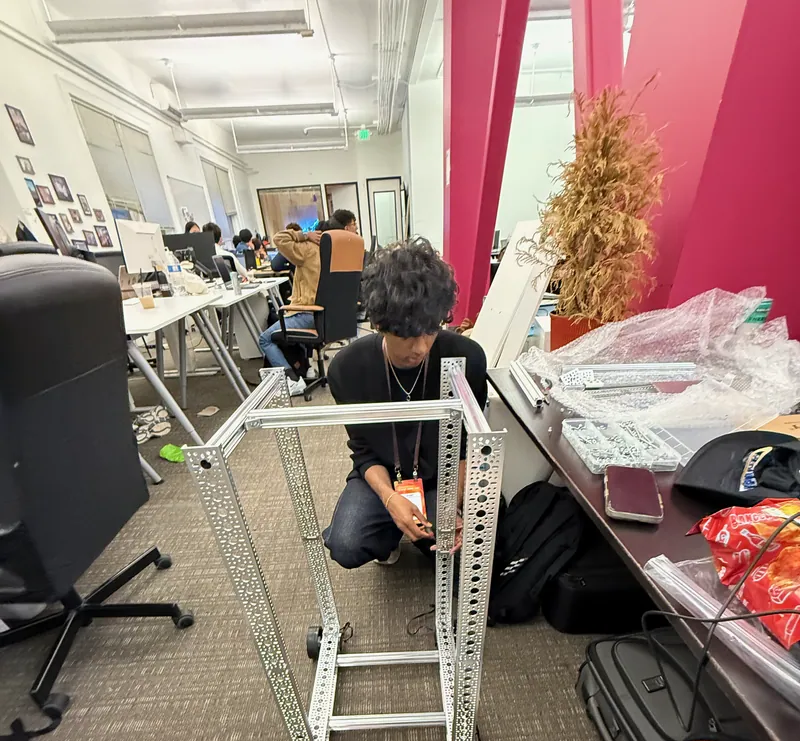
8:35 pm: assembling the frame Later that night
First drive test
The base drives with the battery and a board still on the floor on long leads.
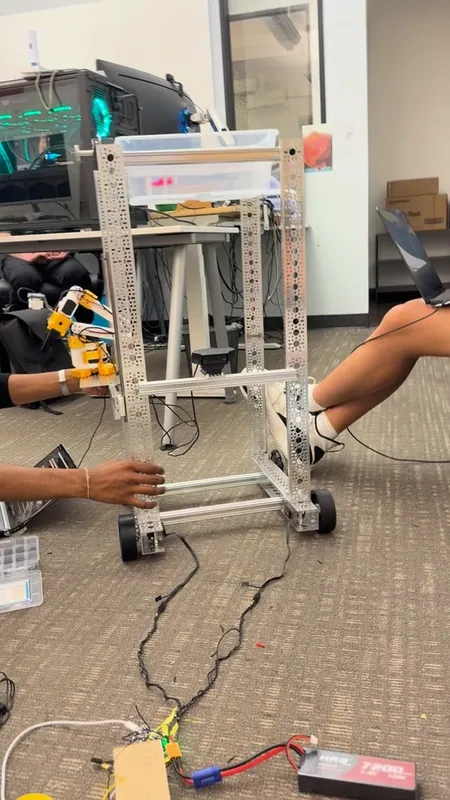
The bare drive base during its first test, battery and board on the floor 3:10 am
Recording demonstrations
Grasp demonstrations for the ACT policy, recorded with the leader arm over the shelf.
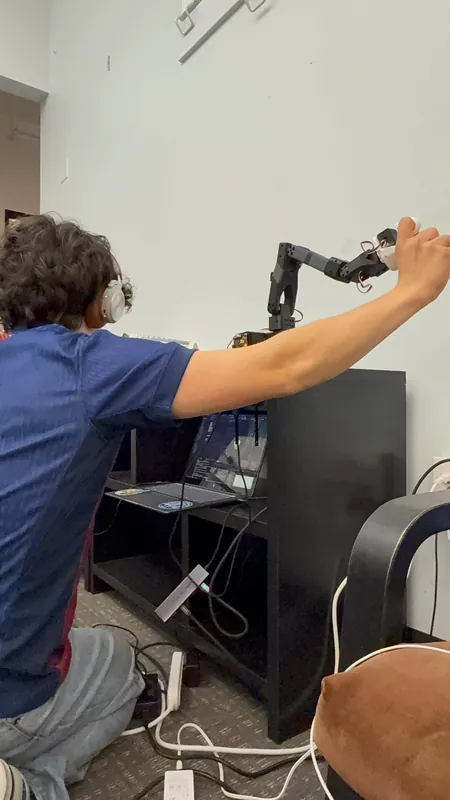
3:10 am: recording demonstrations with the leader arm 3:20 to 6 am
Everything at once
Frame, drive, lift, arm, three cameras, the planner, the policy and the messaging all had to work together, and overnight there were a lot of moving variables. We got it done, and filmed takes for the submission video until about 6 am.
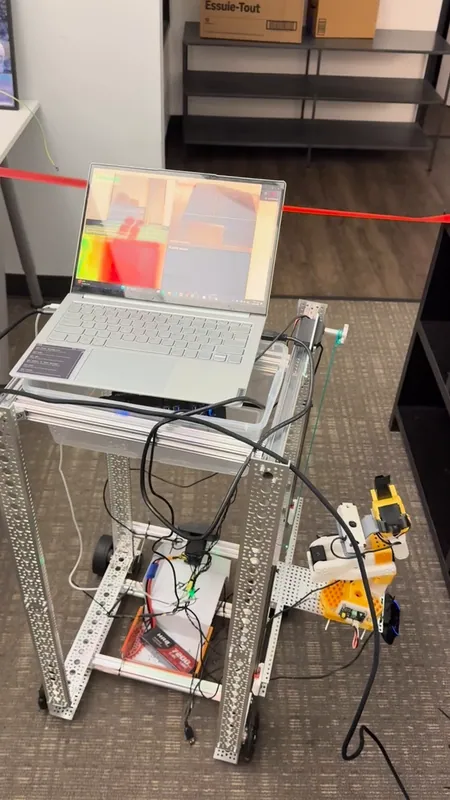
One of the takes: beside the shelf, with the planner view on the laptop Morning
2nd place
At judging the whole loop ran end to end. Golden Retriever took 2nd of 250+ teams (1,500+ hackers).
The announcement at the awards


What I would build next
Next time
Light the claw camera with an LED at the end of the arm (see the grasp), so the one camera the policy sees gives it the same picture in any room.
Build Walk with me: a walker that senses your pace and assists you like a pedal-assist e-bike. It was part of the idea from the start, and the one piece we ran out of time for.